

For reasons that are right now a complete mystery, when I try to view links to .pdf documents, the following happens:
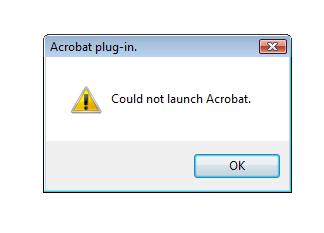
I then have to click the “OK” twice, then go back and right click the link to the document, save it to my desktop, and then view it that way. It would be nice if the thing would just open the way it is supposed to and did as recently as a few days ago.
Any suggestions? How do I fix this? And no, I have not installed anything new, and this is the Vista machine.
I will ban anyone who even thinks about turning this thread into an Apple v. PC debate.
James Hare
Uninstall Acrobat and re-install it. Had a similar problem with a PC here at work and that was the only thing that fixed it.
Conservatively Liberal
Have you updated your Acrobat recently? It is possible that your plugin is not ‘seeing’ Acrobat. Try reinstalling the plugin.
If that fails, keep a hammer close by.
neal peart
Number 1 is correct.
Jeff
You restart yet? Not to be all IT about it, but after years of being prescribed that same medicine, it’s my first course of action, always.
Comrade Darkness
re-install from a fresh download.
Adobe has an auto updater thing because it tends to have security holes. It possibly did something to the install without your knowledge.
Dave
Re-install XP. Duh. : )
Crusty Dem
I agree with James, but it could also be your browser settings.
John Cole
@James Hare: Ugh. I hope I can find my disc. I have a paid version.
Comrade Darkness
>Re-install XP. Duh. : )
Heh.
TheHatOnMyCat
I can and will operate anywhere from 10 to 20 different machines on any given day.
You may not have installed anything, but Windows may have. Check your update history. And be prepared to do a restore to a point at least several days back.
Windows Update may have nothing to do with your problem, but for my Vista machines, it happens often enough that once I have done the obvious stuff, I look at rolling back updates. This solves my problem about half the time.
Vista is an update whore. Unless you have turned off Windows Updates, it is always doing something in the background.
Joshua Norton
Are you using Firefox? I just had a new version auto-install on me. Make sure your Adobe add-on is compatible with the new software. I always lose a few things when they push out a "new & improved" version of FF.
Matthew
If you use Firefox download Foxit Reader it is much smaller and faster than Acrobat.
Comrade Darkness
@John Cole,
you don’t need the disc, just the registration key.
In order to fix your browser plug in, I don’t think it matters. Especially since running it directly is still working. Try just downloading the regular reader if you can’t find your key.
The Other Steve
I would try the reinstall Adobe first.
Next idea. If you open Acrobat Reader by itself, and then go to Edit -> Preferences… under the Internet section is an option titled "Display PDF in browser". By turning this off, PDF documents will launch acrobat independently. I prefer it to operate this way.
BAS
Download Foxit Reader – it’s like Acrobat, except about a billion times better (faster, won’t crash your PC, tabbed viewing for multiple docs, etc.).
Available here.
Joshua Norton
What he said. You don’t really need Acrobat just to read PDF’s.
UG
Install Foxit Reader, it’s a freeware program that is absolutely great, much much faster than Adobe Acrobat reader. I never use Acrobat anymore. Try it.
TheHatOnMyCat
@Joshua Norton:
Yes, that too.
El Cid
Have you considered calling for a tax cut yet? That always works.
milo
See BAS at #14. Foxit is the way to go.
Graeme
I don’t have much to add, other than to say that my Vista and XP machines both seem to like to go to war on Adobe products regularly. Vista particularly hates Acrobat and Presenter.
BenA
Install a free third party Adobe plug in. There are a couple of halfway decent ones out their… for the most part they are MUCH smaller. I use one at home, but unfortunately I don’t have it’s name.
Rex
Third in favor of Foxit. Also includes a scaled measuring tool for doing take-offs from building plans. If you ever have need of that sort of tool.
Ugh
I do find that eating non-organic Granny Smiths tends to rile up the politically correct here in my office.
JGabriel
So is this the thread where we talk about Linux?
(Ducks and covers)
.
TheHatOnMyCat
@milo:
Just installed it, very cool, thanks for the tip.
Foxit = win
theturtlemoves
@milo: I third (or maybe fourth or fifth if anyone beat me to the punch) the recommendation of Foxit. Acrobat is a bloated piece of crap.
robertdsc
Ha.
lutton
whoa, slow down with the complete reinstall until you check if Acrobat/Reader is trying to, or waiting to update itself. I’ve had that exact thing happen, and it seemed to be related the the Adobe updated waiting to perform an update it had downloaded.
edit: wow, what was up with my typing on that?!?
Once I let it do that, everything began working as it should.
A complete uninstall and reinstall should also rectify that stituation, but might not be necessary if you peform the update.
Dave Herman
You deal with these things kind of the same way as your school librarian taught you to use the card catalog: start with the most specific thing you hope should work, then work outwards to broader and broader solutions.
In this case, try these steps until you hit on one that works (#4 is the most likely, as others have already suggested).
1. Restart your web browser.
2. Restart your computer.
3. Reinstall the Acrobat plugin.
4. Reinstall Acrobat Reader.
5. Reinstall the web browser.
6. Reinstall Windows.
7. Dig a 3 foot hole in the ground, bury computer inside, refill with soil and fertilizer, water regularly, and hope something more useful grows.
Fwiffo
Turn off the plugin and it should resort to using the external program.
See, the way browser plugins work, is that they read your mind, then do the exact opposite of what you want, then crash the browser. Brilliant technology, really.
JenJen
Speaking of Acrobat, do they update their software like, every half-hour or something? Seems like every time I open a .pdf, Adobe prompts me to install the newest version.
Gah!!
Dave Herman
John: if you have a paid version of Acrobat, I bet you should probably be able to download it and use your key. If you’ve lost the key, you can probably contact Adobe and have them send you a new one. You’re a paying customer–they’re your bits! So to speak.
Blue Neponset
Cast remove curse.
Joshua Norton
Or you could get a scribe and a quill pen. The only problem there is you have to keep hollerin’ "Hurry up!" at them. Also.
bvac
Another vote for Foxit. Even though the latest acrobat has been slimmed down quite a bit, Foxit still rules.
Punchy
Agreed! Just because Apple sucks, is overpriced, is trendy, and launches minor accessories like a iPod leather case with the fanfare reserved for moonlandings and assassinations doesn’t mean we need to debate their inferiority with PCs.
Maxwel
I also recommend Foxit.
Caladan
First, download the latest version of acrobat form adobe.
Second, Close all your browsers.
Third, uninstall acrobat using the uninstall wizard.
Fourth, Install the new version of acrobat
dmsilev
I’m a strong believer in "the best of both worlds". Mac, with a copy of VMWare or Parallels, hosting a session of XP running inside a virtual machine. If you use what Parallels calls Coherence mode, all applications share the same desktop irrespective of what OS they’re running under, making it trivial to mix and match. (VMWare has something similar, though I forget the name).
It’s technically possible to go in the other direction, with a Windows machine as host, and OSX running inside the virtual machine, but Apple’s EULA prohibits that. I’m sure people have hacked together solutions to do it, but nobody’s selling a turnkey solution.
-dms
Catsy
Quoted and affirmed for the umpteenth time. Acrobat, like so many other Adobe products, is a cumbersome, unintuitive, bloated piece of crap that achieves widespread usage only by dint of the fact that it’s their format.
spork_incident
Use a Mac
(What, 30-some comments and not this?)
Speaking of Acrobat, do they update their software like, every half-hour or something?
Truly.
.
SLKRR
No reason to start an Apple vs. PC war when this thread is perfect for Vista bashing.
mantis
Foxit Reader is the way to go. I used to have all kinds of problems opening .pdf files from browser links using Acrobat. Foxit works great and uses a fraction of system resources.
Face
It cracks me up that every tech thread Cole starts ends up with about 150 of the following comments, almost verbatim:
"John, it’s cuz (fill in any software) absolutely sucks. It’s outdated, unuseable, and a piece of crap. Try (fill in some obscure acronym’d name with at least 5 letters, some uppercase, some lowercase, sold/offered by some no-name company in Seattle), its the shit."
So many nerds, so little time.
Peter J
I guess with the news that Pajamas Media is shutting down their ad network, the circus left. So no more acrobats.
For a more serious answer, I would add my voice to the heap of voices telling you to install Foxit instead.
The Moar You Know
Let’s face it, people – why bash either Apple or Microsoft when we can bash Adobe – and for far better reasons?
Look, Vista is fine. Those who don’t like it are crybabies who don’t adapt well to change. Seriously. However, I’ve been using Server 2008 for a few months now and I’ve got to say that it is the nicest OS I’ve ever used.
The Moar You Know
OT: The Artisan of the Brick Oven has died. I expect Backyard Crematory Bill to become an hero shortly.
Bob In Pacifica
No question is stupid.
TenguPhule
Off topic, Hamas really is the worst enemy of Palestinians
I look forward to wilfred and friends explaining how stealing supplies from aid agencies is supposed to help Palestinians.
TenguPhule
But we are all united against Vista, where’s the fun in that?
Josh Hueco
Any opportunity to repost this Onion story is golden. And I say that as a bona fide Mac cultist, complete with iPod, MacBook, Time Capsule, and the whole suite of iWork/iLife/Aperture software.
Karen
Hmmm. I went to create an Acrobat document, & it couldn’t find the PDF filemakers. I’ve already had it run in repair mode & restarted. Didn’t work. Had to fax in the docs that needed to go. I just did a delete/reinstall from the disk, a week or so ago. This is a Vista machine.
Help?
Nannergrrl
If you also have Reader installed on your comp, then the two have begun to fight like pigs under a blanket. Just remove your Reader program and have all of your Adobe needs meet by Acrobat.
gizmo
Windows once gave me an error message that said:
"Your domain needs to be resolved."
Ever since, I’ve had doubts about the legitimacy of my existence.
TheHatOnMyCat
@Punchy:
FTW
frederick the omnipotent
John,
You might try the Medeival Help Desk:
http://www.youtube.com/watch?v=pQHX-SjgQvQ
Eric U.
I’ve bought some computers recently from Dell. I always laugh when they call the operating system "Vista downgrade."
What they mean is that the system comes with XP installed, but it has a Vista license. But it’s still funny.
I have grown to hate Foxit reader. I just upgraded, and maybe it will be better.
joe in oklahoma
John, it doesn’t have to be an Apple vs Windoze debate, but …
you could utilize safari browser on a PC.
safari opens all PDFs in the browser unless you direct it to do otherwise. very helpful.
just trying to offer a suggestion.
Screamin' Demon
Banning people for their thoughts? How liberally fascistic of you.
rreay
@BAS:
Last time I tried foxit it did a lot of things right. But… It’s printing ability blows. It printed blocky fonts and could never deal with margins and borders right.
Hedley Lamarr
Another vote here for Foxit. My only Adobe product now is Flash. Make sure you keep that updated, and for that I recommend Secunia PSI.
bago
Technically, it looks like the registration of the pdf extension/MIMEtype is corrupted in your browser settings. It’s probably looking for acroPDF.dll and can’t find it either due to a path mismatch or a registry mismatch. Uninstall-reinstall of the plugin should reset the registry and path to the proper places.
Tim in SF
OFF TOPIC
—-
Has anyone see this? Latest cuts to the stimulus are nauseating.
http://theplumline.whorunsgov.com/stimulus-package/latest-cuts-to-the-stim-package-head-start-child-nutrition-food-stamps-public-transit/
—-
/OFF TOPIC
Nerf
Spit in the back and give it a good whomp.
TeriMac
Restart your computer if you already haven’t and then if that doesn’t work open your taskmanager see what is running and what software is running and what isn’t running. It may be running in the background, and if it is you simply want to make sure the program isn’t running, shut it down through the taskmanager. Restart and everything should be fine.
different church-lady
Why do you want to read that document anyway?
TeriMac
Open your taskmanager by the old ctrl/alt/delete method. It is the second tab it says processes.
NonWonderDog
Foxit is fucking worthless to me until they fix their codepage support. It should NOT be hard to write a program that can open files with Cyrillic names.
Martin
John, this is not the PDF you are looking for.
/Vista Jedi hand wave
Quit trying to fight the Force.
Catsy
And yet for those paying attention, it’s amazing how many of those threads end up with John using and loving some obscure acronymic freeware made by some college kid in Seattle based on the recommendations of so many nerds.
Why, it’s almost as if the near-unanimity of the recommendations in these threads had some deeper meaning beyond identifying the shocking fact that a blog has a large nerd population! I’m sure it’ll come to you.
drag0n
Buy a mac already.
Sheesh…
Polish the Guillotines
Things you hear at Cirque du Soleil ?
Ripley
Upgrade to DOS already. Shee… wait, what?
Jason
Another vote for Foxit here. Big improvement over Acrobat.
Steeplejack
@different church-lady:
Heh. Good one. That works for me a lot.
dianne
We had the same problem with Adobe – when we downloaded Vista, Microsoft installed a patch on Adobe and it disabled Adobe. Got rid of Vista and reinstalled XP but the patch remained. Could not reinstall or upgrade Adobe and have been dead in the water as far PDF files are concerned for months.
Just installed Foxit and just printed my first PDF file since we started this whole mess.
Thank you – we were about to call in the techs and now we don’t have to.
DrDave
I’ll cast another vote for Foxit; it is faster and a much more dependable way to open pdfs, especially from within Firefox.
This holds true whether you are running Winders on a PC or in Boot Camp on your Mac. 8>)
stacey
Recently certain online journals have started making their default downloaded files into html pdfs where you have to be connected to their server to be able to open. It takes some doing but you can force them to download as a pdf, or convert to normal pdf while attached to their server.